
Check Modules Exist
You don't need to install smtplib/email, because they are in standard library.
Without Error Massage!!
import smtplib
import email
Let's Start!
- The protocol used for sending email
- SMTP dictates:
  * How email messages should be formatted
  * Encrypted
  * Relayed between mail servers
  * The other details that your computer handles after you click
Connecting to an SMTP Server
| Provider | SMTP server domain name |
|---|---|
| Gmail | smtp.gmail.com |
| Outlook.com/Hotmail.com | smtp-mail.outlook.com |
| Yahoo Mail | smtp.mail.yahoo.com |
In [3]:
import smtplib
smtp = smtplib.SMTP('smtp.gmail.com', 587)
type(smtp)
Out[3]:
Notice!
- Please connected to the Internet avoide socket.gaierror: [Errno 11004] getaddrinfo failed or similar exception
- The port is an integer value and will almost always be 587
- If SMTP server not support TLS on port 587.Please using smtplib.SMTP_SSL() and port 465 instead.
In [7]:
import smtplib
smtp = smtplib.SMTP('smtp.gmail.com', 587)
smtp.ehlo()
Out[7]:
Greeting Success Lucky Number is "250"!
In [9]:
import smtplib
smtp = smtplib.SMTP('smtp.gmail.com', 587)
smtp.ehlo()
smtp.starttls()
Out[9]:
Server is Ready Lucky Number is "220"!
Logging in to the SMTP Server
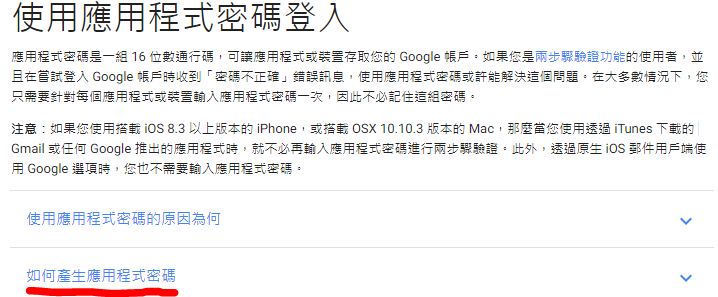
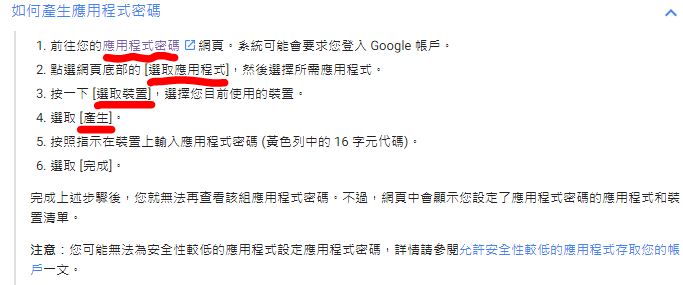
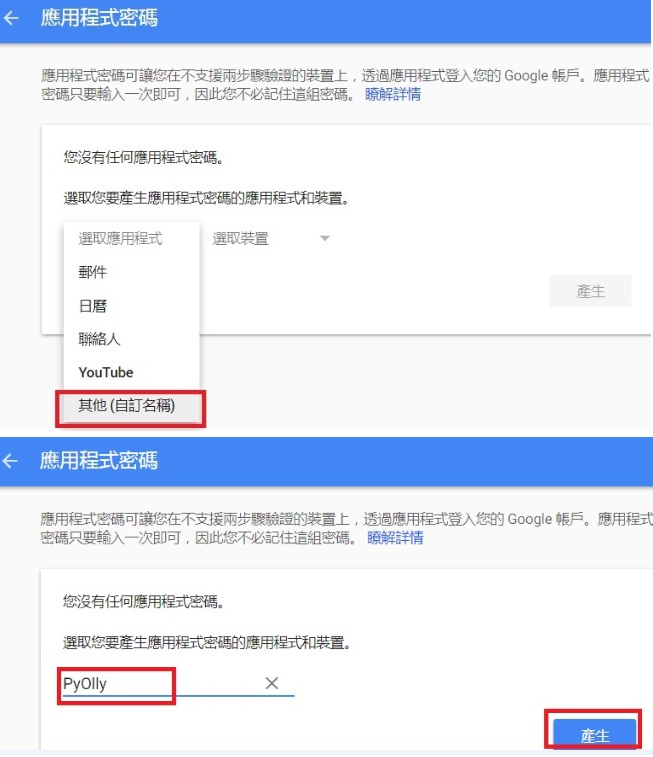
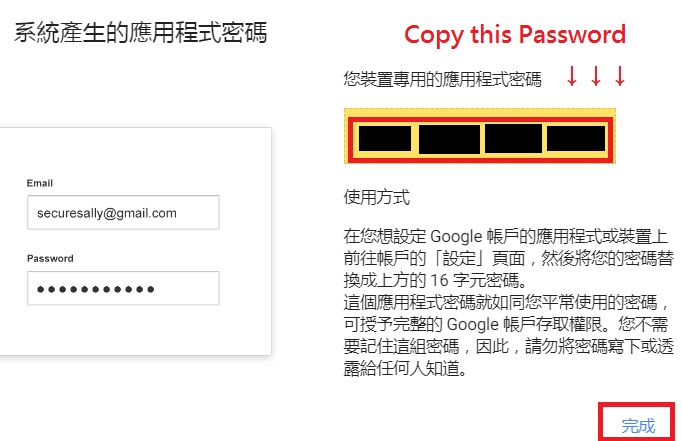
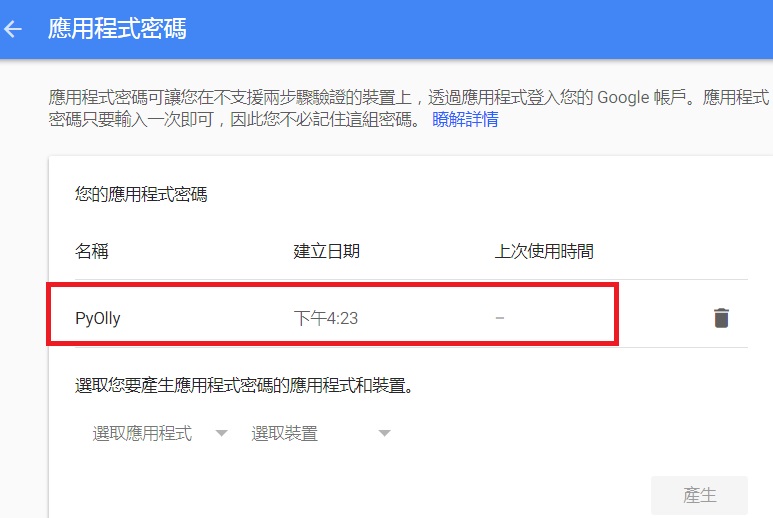
If you use Gmail, setup before login to SMTP server
>> Two Step Authentication
>> Gmail Applicaiton Password
import smtplib
smtp = smtplib.SMTP('smtp.gmail.com', 587)
smtp.ehlo()
smtp.starttls()
smtp.login('My_EmailAddress@gmail.com','My_PassWord')
Authentication Success Lucky Number is "235"!
In [7]:
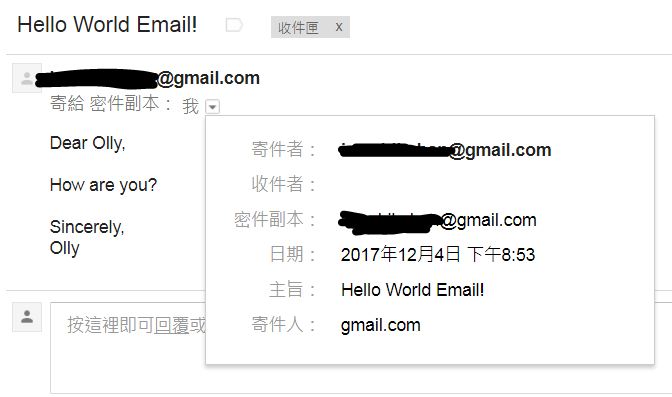
smtp.sendmail('iamshihshan@gmail.com',
              'iamshihshan@gmail.com',
              'Subject: Hello World Email!\nDear Olly,\n\nHow are you?\n\nSincerely,\nOlly')
Out[7]:

In [10]:
smtp.quit()
Out[10]:
Email Module
Sending Email with Attachment

Import Modules
In [1]:
import smtplib
from email.mime.multipart import MIMEMultipart
from email.header import Header
from email.mime.text import MIMEText
Logging in to the SMTP Server
import smtplib
smtp = smtplib.SMTP('smtp.gmail.com', 587)
smtp.ehlo()
smtp.starttls()
smtp.login('My_EmailAddress@gmail.com','My_PassWord')
Structuring Subject and Contents
.MIMEMultipart()
.Header('subject', 'type')
.MIMEText('email contents', 'format','type')
In [17]:
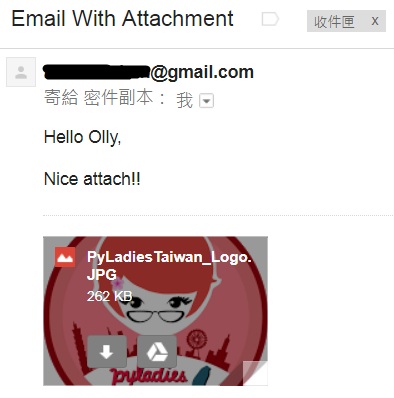
message = MIMEMultipart()
message['Subject'] = Header('Email With Attachment', 'utf-8')
message.attach(MIMEText('Hello Olly,\n\nNice attach!!', 'plain', 'utf-8'))
Attaching File
In [ ]:
att = MIMEText(open('Imgs\D4_08.JPG', 'rb').read(), 'base64', 'utf-8')
att["Content-Type"] = 'application/octet-stream'
att["Content-Disposition"] = 'attachment; filename="PyLadiesTaiwan_Logo.JPG"'
message.attach(att)
Sending Email With SMTP
In [5]:
smtp.sendmail('iamshihshan@gmail.com',
              'iamshihshan@gmail.com',
              message.as_string())
Out[5]:
Sending Email Embedded with HTML
Import Modules
In [22]:
import smtplib
from email.header import Header
from email.mime.text import MIMEText
Logging in to the SMTP Server
import smtplib
smtp = smtplib.SMTP('smtp.gmail.com', 587)
smtp.ehlo()
smtp.starttls()
smtp.login('My_EmailAddress@gmail.com','My_PassWord')
Structuring Subject and Contents
.Header('subject', 'type')
.MIMEText('email contents', 'format','type')
In [23]:
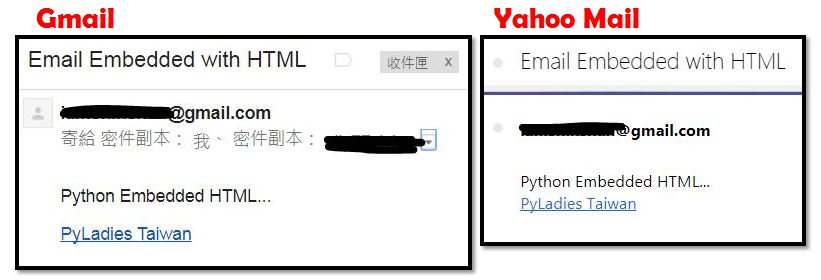
message['Subject'] = Header('Email Embedded with HTML', 'utf-8')
mail_msg = """
<p>Python Embedded with HTML...</p>
<p><a href="http://tw.pyladies.com/">PyLadies Taiwan</a></p>
"""
message = MIMEText(mail_msg, 'html', 'utf-8')
Sending Email With SMTP
In [8]:
smtp.sendmail('iamshihshan@gmail.com',
              ['iamshihshan@gmail.com','olly77vivian@yahoo.com.tw'],
              message.as_string())
Out[8]:
Exercise
Send Any Kind of Email to Anyone You Want
- Get 16-digits process key form gmail
- Choose notification picture you like (or any file you want)
- Import modules
- Structuring email subject and contents
- Sending with SMTP
import smtplib
from email.mime.multipart import MIMEMultipart
from email.header import Header
from email.mime.text import MIMEText